
You've put the hours in. The words still won't come when someone's waiting for an answer.
I learned French at 19, living in Paris, 25 years ago, and had barely spoken it since.
At first, I was very sceptical about practising with an AI.
Then the app got French out of my mouth for the first time in over a decade. It wasn't a perfect conversation. It was a really emotional experience.
Five minutes the first day, then ten, then fifteen, five days running.
The app asks an annoying number of questions, and it gives you nothing of the human being on the other side.
Being able to practise at any hour is what AI changed. These apps do very different jobs.
Disclosure: Langua, at number one, is a company I've invested in. The StoryLearning App, at number two, is my own. Teacher AI, at number nine, is a company I co-founded, though I'm not involved in running it. StoryLearning may earn a commission if you sign up through the Langua or Teacher AI links below. The other six apps earn me nothing.
Langua, which I've invested in, is my pick for the best AI language learning app for speaking. For reading, the pick is the StoryLearning App, which is my own. No single app on this list trains every skill, which is why each one here is ranked by the skill it does best.
After those two, ChatGPT is the one I'd use for writing feedback and grammar questions, Speak suits beginners who want a speaking course, and Duolingo Max is here for the daily habit and nothing else.
LingQ covers reading and listening to material you choose yourself, Lingopie is for listening, TalkPal is for speaking practice in less common languages, and Teacher AI is for intermediate speaking practice.
The way to use the list is to pick by the skill you're short of. You don't need all nine, and you probably don't need one app that claims to do all of it. The serious move is usually one app for speaking and one for reading or listening.
Get that pairing right, and the rest of the decision tends to sort itself out. Choose for the missing skill, not for the feature list.
Table of Contents
Why ‘AI' On The Label Tells You So Little

I spent years learning Japanese in Tokyo, and I could understand far more than I could say. I could follow a conversation over dinner, but the moment the focus turned to me, I froze. The words were in there somewhere, but they wouldn't come out.
What fixed it wasn't another course. I stopped studying altogether and arranged daily language exchanges after work. Within weeks I was talking, and the panic had gone.
Looking back, the problem was obvious. I had spent those years training my ears and eyes, because that was what every course asked me to do. I had never trained my mouth.
The lesson wasn't that I lacked knowledge. Understanding a language and speaking it are separate skills. You build each one by doing that thing a lot.
That's the trouble with asking for the best AI app. The word AI doesn't tell you which job the app actually does. In these apps, AI does three different jobs.
The first job is talking with you. Langua, which I've invested in, is built for that: you speak to it and it speaks back, so you can practise without needing another person.
The second job is writing for you. The StoryLearning App, which is my own, writes stories for your level, so you are reading something you can understand from the first line.
The third job is explaining to you, and it covers Lingopie and ChatGPT. Lingopie teaches through television, with one AI feature that explains the grammar of a subtitle line.
ChatGPT is a general assistant whose maker's own feature list includes no course, no vocabulary system and no review schedule, but it explains and corrects well when you ask, and those are three different jobs.
Once you see that, the marketing starts to make sense. You can be short of one and not the others. Duolingo teaches more than 40 languages, but its AI video calls exist in six of them, and the part that talks with you is the exception, not the rule, and that gap is the thing to check before you buy.
In Tokyo, I didn't need a better app. I needed to practise the skill I was short of. The method had done its job.
My position is simple. Reading and listening to material you can understand is the foundation, and the name for that is comprehensible input. Speaking is a separate skill that you build by speaking a lot.
The list below is ranked by the one skill each app is genuinely best for, so you can match the tool to the gap you're actually trying to close.
The useful question isn't which AI app is best. It's which skill am I short of, because the app choice follows from there.
How I Put This List Together

Every price, free trial and language list on this page was checked on the companies' own pages on 19 September 2026. Prices are in US dollars, from each pricing page or its US app-store listing where no public price exists. Some companies price differently by country.
I've written about most of these apps before, and the judgements below rest on those write-ups.
A few gaps, then. Duolingo publishes no price for its top tier, so none is given. Langua's website shows prices in your own currency, so its app-store price is used here.
Four things decided the order: what the AI does beyond chatting back, whether the app is honest about the one skill it's for, how many languages the AI part covers as against the course list, and whether you can see the price before you sign up.
Those four things don't decide the top two places, and I'm not going to pretend they do. The top two are the two I have a stake in: Langua, which I've invested in, and my own app.
Langua is first because of what it does with your mistakes: it reports them back after each conversation and builds grammar drills out of them. That's why I put money into it, not the other way round. My own app is there because it's mine, and reading is what it does.
Every price, language list and limit came from the companies' own pages, so you can check me. If you'd rather not buy from me, I've named an alternative for both jobs on purpose.
The Best AI Language Learning Apps At A Glance
| App | Best for | What the AI does | Languages | Where it runs | Free option | Price (as of September 2026) |
|---|---|---|---|---|---|---|
| Langua | Speaking | Talks with you, reports your mistakes, builds drills from them | 23 | Web, iPhone, Android | Free account (3 mins of calls a day, 20 chat messages a week), plus a 5 or 7 day trial | $19.99 a month or $149.99 a year (Standard) |
| The StoryLearning App | Reading | Writes stories for your level and brings back the words you save. A narrated audio each month to try the feature; full narration for every story is on a separate plan | 10 | Web browser only | None | $15 a month or $135 a year |
| ChatGPT | Writing feedback and grammar questions | Explains and corrects when you ask; voice chat | No fixed list | Web, iPhone, Android | Free plan | $8 a month (Go), $20 (Plus), from $100 (Pro) |
| Speak | Speaking, for beginners | Lessons, role-plays and a tutor you talk to | 6 | iPhone and Android only | 7 day trial only | $17.99 a month or $83.99 a year |
| Duolingo Max | The daily habit | Short video calls and role-plays | 40+ courses, AI calls in 6 | Max features: iPhone and Android only (the free course runs on the web) | The whole course is free | Not published by Duolingo |
| LingQ | Reading what you choose | Rewrites any text at a beginner's level; transcribes audio you import | 40+ or 50+, by its own count | Web, iPhone, Android | Free plan, 20 saved words | $14.99 a month or $119.99 a year |
| Lingopie | Listening | Explains the grammar of any subtitle line | 12, 15 or 17 by its own count | Web, iPhone, Android, smart TVs | 7 day trial only | $83.88 a year |
| TalkPal | Speaking, in less common languages | Chat, calls, role-plays and debates | 130+ | Web, iPhone, Android | 10 minutes a day, plus a 14 day trial | $19.99 a month or $119.99 a year |
| Teacher AI | Speaking, for intermediate learners | Calls with AI clones of YouTube teachers | 30+ or 60+, by its own count | Web, iPhone, Android | 3 or 7 day trial only | $15 a month or $97 a year |
1. Langua (Best For Speaking)

99% of Langua's learners sign up to practise speaking, according to its maker. That tells you what it's for before you've opened it.
The core of Langua is conversation practice. You can take what Langua calls Call Mode, a hands-free spoken conversation, or use its Chat Mode to listen and read, listen first, or type.
There are role-plays for travel, work and social life, and debates aimed at intermediate and advanced learners.
For Spanish, Langua is the best AI Spanish app I've found for serious speaking practice and feedback.
After each conversation, you get a report on your mistakes, and Langua builds grammar drills from the errors you make most often.
You can choose how you're corrected, from no interruptions to explicit correction, and you can say a word in your own language when you're stuck.
Speaking is a skill, like tennis. You can watch the pros and know the rules, but until you've hit a thousand serves, you don't have it in your body. Langua is a way to hit serves at any hour.
Langua isn't perfect. As with any AI tool, the transcription occasionally mishears you, though Langua lets you switch between the best transcription models.
On the $19.99 a month plan, as of September 2026, calls stop at 30 minutes a day. Langua's human tutoring is a separate product with its own prices, not part of the subscription.
Best for: speaking. Langua suits the learner who wants daily conversation reps with real correction and will do them on a schedule, even at odd hours.
Not for: anyone studying Japanese or Chinese, where Langua is still in beta, or Arabic, which works on the web only, because those learners should look for a tool that's further along in their language.
Price: $19.99 a month or $149.99 a year (Standard), $29.99 or $199.99 (Unlimited), as of September 2026. These are US App Store prices: Langua's website shows prices in your own currency.
Languages: 23: English, Spanish, French, German, Italian, Portuguese, Dutch, Swedish, Romanian, Russian, Greek, Turkish, Danish, Norwegian, Finnish, Polish, Czech, Croatian, Japanese, Chinese, Korean, Hindi and Arabic. Japanese and Chinese are in beta, and Arabic is web only.
Where it runs: web browser, iPhone and Android.
Free: a free account (about 3 minutes of calls a day, about 20 chat messages a week), plus a 5 or 7 day trial of the paid plan (card needed, not charged during the trial).
Refunds: 30 days, on web and Google Play purchases. Langua itself recommends not subscribing through the App Store, because it has no control over Apple's refunds.
2. The StoryLearning App (Best For Reading)
This one's my own app, so weigh what follows with that in mind, and I'll lean harder on its weaknesses than on any other app on this list.
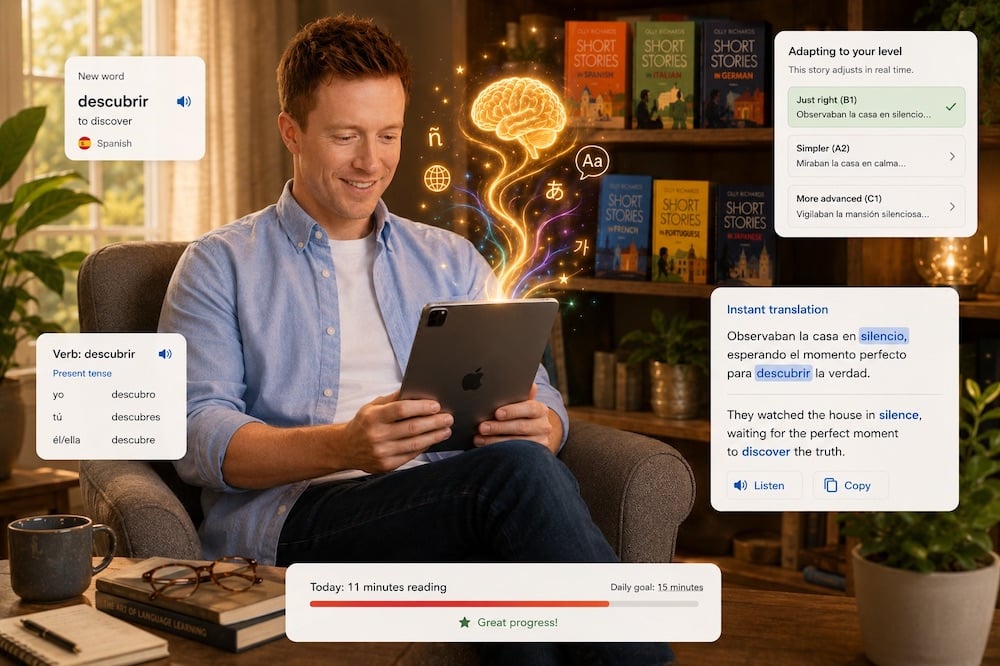
The AI here writes stories instead of talking to you. Each story is written for one reader, for that reader's level, in the genres they chose, weaving in the words they saved. You pick the genres from a list of eight, and the stories come in short chapters.
You save words as you read, and the app writes those saved words back into your later stories at growing intervals until they stick. That's spaced repetition, but it happens inside new stories rather than on cards. There are no flashcards, no review sessions and no quizzes.
For audio, you can trial the narration with a free audio each month, and full narration for every story sits on a separate plan. The approach here is comprehensible input, which just means learning from stories you can mostly understand. The suggested habit is 15 minutes a day of reading.
The StoryLearning App costs $15 a month or $135 a year, as of September 2026. One subscription covers every language. It gives you up to 20 new stories a month across all your languages together.
There's no free trial and no free version.
It runs in a web browser on a phone, tablet or computer, with nothing to install. It isn't in the App Store or Google Play, though, and you can't read offline. It will still work on your phone, just not through an app store.
There's no speaking practice and no conversation of any kind. It's not for complete beginners. You need an elementary A2 foundation before the stories work.
It launched in 2026, and it covers ten languages. So there's nothing here for learners of any other language. There are no grammar lessons or exercises, no writing practice and no video.
There are no streaks, leaderboards or games. There's no catalogue of other people's content, and you can't bring your own material.
Best for: reading. It suits the learner who wants a daily story habit and wants the words they save to keep coming back in the next stories.
Not for: anyone who wants speaking practice or a conversation partner, and it's not for complete beginners, because there's no conversation of any kind and the stories need an A2 floor.
Price: $15 a month, or $135 a year (US dollars), as of September 2026
Free trial: none
New stories: up to 20 a month, across all your languages (re-reads not counted)
Audio: a free audio each month to trial the narration; full narration for every story on a separate plan
Languages: Danish, Dutch, English, French, German, Italian, Norwegian, Portuguese, Spanish and Swedish, with separate Spain and Latin American Spanish, and European and Brazilian Portuguese
Level: from about A2 (elementary) to advanced; not for complete beginners
Where it runs: web browser on a phone, tablet or computer; not in the App Store or Google Play
3. ChatGPT (Best For Writing Feedback And Grammar Questions)
ChatGPT is a general assistant, not a language app.
That sounds like a drawback, but it's also the useful thing about it.
Ask it to answer, explain and correct. Paste in something you wrote and ask what is wrong with it, or ask why a sentence works the way it does.
It has a study mode that asks you questions, explains step by step and checks your understanding. It's for any subject, not languages in particular, and it's on every plan.
I tested ChatGPT extensively for language practice. It works fine as a conversation partner if you're willing to do the setup work yourself.
ChatGPT Plus is $20 a month, as of September 2026. There's no free trial of the paid plans, because the free plan is permanent. Voice on the free plan is limited, and OpenAI gives no figure for the limit.
The real weakness is structure. No suggested topics, no vocabulary system, no grammar tracking. If you ask ChatGPT to correct you it will, but you have to ask every time.
I found the audio mode impressively lifelike, and you can interrupt it mid-sentence. But the moment you stop to think, it cuts you off, which is genuinely frustrating when you're searching for a word.
Best for: writing feedback. If you're willing to paste in what you wrote and ask what's wrong, ChatGPT will correct it and explain why.
Not for: anyone who wants a structured language course with topics, a vocabulary system and a review schedule handed to them, because you'll be building all of that yourself.
Price: free, or $8 a month (Go), $20 a month (Plus), or from $100 a month (Pro), as of September 2026.
Languages: no fixed list: it is a general assistant, not a course.
Where it runs: web browser, iPhone and Android.
Free: a permanent free plan, with limited voice.
4. Speak (Best For Beginners Who Want A Speaking Course)
Speak's own website won't tell you what you'll pay.
It calls itself the language learning app that gets you speaking, then asks for a payment method for the free trial before you've seen a number.
The app itself is well built. Speak has a clear focus on beginners, with a smooth interface, voices that sound natural, and scenario role-plays that cover useful real-life situations.
Speak teaches six languages to English speakers: Spanish, French, Japanese, Korean, Italian and Chinese. German and Portuguese are missing, so check before you commit.
Speak's Premium tier is $17.99 a month or $83.99 a year on the US App Store, as of September 2026. The features that target your frequent mistakes and the personalised study plan sit in the dearer Premium Plus tier.
Speak's feedback is fairly light. You get flagged when something is wrong, but not much explanation of why. At intermediate level and beyond the lesson variety starts to feel thin.
Best for: speaking. Speak suits the beginner who wants natural-sounding audio and useful role-plays that get them talking.
Not for: anyone above intermediate level, or anyone who wants feedback that explains the mistake rather than just flags it.
Price: $17.99 a month or $83.99 a year (Premium), $39.99 or $164.99 (Premium Plus), as of September 2026. US App Store prices: Speak publishes none on its website.
Languages: six for English speakers: Spanish, French, Japanese, Korean, Italian and Chinese.
Where it runs: iPhone and Android only. There is no desktop version.
Free: no ongoing free version. A 7 day trial, payment method needed and charged automatically unless you cancel at least a day before it ends.
Refunds: a full refund within 7 days on website and Google Play purchases, and none after 30 days. App Store purchases go through Apple.
5. Duolingo Max (Best For The Daily Habit)
People write to me saying they had a 600-day streak and still can't hold a conversation. And yet Duolingo needs no sales pitch from me: nearly everyone has used it or felt guilty about abandoning it.
For motivation and consistency, Duolingo is hard to beat. The core course is free across more than 40 languages, with adverts and limits, and that free course is the real offer.
Duolingo Max is the dearest tier. It adds two AI features: Roleplay, and Video Call with a character called Lily, in the phone and tablet apps only.
Duolingo's Video Call works in six languages: English, French, Spanish, Italian, German and Portuguese. Its blog posts claim more, adding Japanese, Korean and Chinese, which its help centre does not. Most courses have no Max features.
Speaking practice is not what Duolingo was built for, and the AI conversation features feel like an add-on to the core gamified experience.
Lily's default setting is faintly teenage boredom, and she doesn't correct your grammar during the call. The calls run about a minute early on, up to 3 minutes later, and you get a transcript.
Duolingo publishes no price for Max on any public web page, as of September 2026. It says it runs tests on its subscriptions.
Keep the habit. Max won't fix speaking, though, and if conversation is your bottleneck, this isn't where I'd send you.
Best for: the daily habit. It suits learners who need the streak and a free course that keeps the language alive without asking much.
Not for: anyone who wants real conversation practice with correction. Lily won't push you there, and Duolingo wasn't built for it.
Price: Duolingo publishes no price for Max, as of September 2026. The whole course is free, with adverts and limits.
Languages: more than 40 courses, but the AI video calls are in six languages.
Where it runs: the Max features are on iPhone and Android only, not the website.
Free: yes, the entire course.
For more about this AI app, check out my full Duolingo Max review.
6. LingQ (Best For Reading What You Choose)
LingQ's own pages can't agree how many languages it has. The home page says more than 50, the pricing page says 40 or more.
With LingQ you read and listen to real material, from books and podcasts to films and television, and you can bring in your own.
You save the words you don't know as you go, and I'm a huge fan of tools like LingQ, which encourage reading and listening with simple one-click definitions.
LingQ's AI can turn any intermediate or advanced lesson, including something you found online, into a version a beginner can read in one click.
The catch with LingQ is there's no path chosen for you. You choose everything you read yourself, which is the strength and the work of it.
LingQ's free plan is small: 20 saved words in total and 5 imported lessons. Premium is $14.99 a month, or $119.99 for 12 months, as of September 2026.
No page says whether LingQ's AI features cover all those languages, so check that before you commit.
Best for: reading. If you want to read and listen to real material you've chosen, and you'll save words as you go, LingQ is built for you.
Not for: anyone who wants a set path or a generous free plan.
Price: $14.99 a month or $119.99 for 12 months (Premium), $29.99 or $269.99 (Premium Plus), as of September 2026.
Languages: more than 50 on its home page, 40 or more on its pricing page.
Where it runs: web browser, iPhone and Android.
Free: a free plan: 20 saved words in total and 5 imported lessons.
To learn more about LingQ, take a look at my full LingQ review.
7. Lingopie (Best For Listening)
You sit down to practise listening and end up watching a real show, not a lesson. That's Lingopie's whole idea.
On Lingopie, you watch television and films with subtitles you can click. Click a word and you get its meaning.
The one AI feature its maker describes explains the grammar of any subtitle line while you watch.
You can repeat a caption aloud and get a pronunciation score, and Lingopie runs on the web, iPhone, Android and smart TVs. So the AI is one feature, not the product.
On the same day, Lingopie's own pages gave three different language counts: twelve, fifteen and seventeen. Twelve are named by name, among them Spanish, French, German, Italian, Portuguese, Japanese and Korean.
Lingopie costs $83.88 a year for all languages, as of September 2026, shown as $6.99 a month. There's no free version, and the 7-day trial needs a card. The yearly plan can't be refunded once it's been charged.
Don't expect a conversation partner. Lingopie's own pages list no AI conversation partner and no AI tutor anywhere among its features.
Best for: listening. Lingopie suits the learner who wants real shows, not learner fare, and will click the words they don't know.
Not for: anyone whose bottleneck is speaking, since there's no AI conversation partner here, so look elsewhere for live conversation.
Price: $83.88 a year for every language, or $41.97 every three months for one, or $229 once, as of September 2026.
Languages: its own pages give three counts on the same day, 12, 15 and 17. Twelve are named by name, among them Spanish, French, German, Italian, Portuguese, Japanese and Korean.
Where it runs: web browser, iPhone, Android and smart TVs.
Free: no free version. A 7 day trial, card needed.
Refunds: the yearly plan cannot be refunded once it has been charged after the trial.
For more on Lingopie's strengths and weaknesses, plus a look inside, have a look at my Lingopie review.
8. TalkPal (Best For Less Common Languages)
You open an AI language app, search for your language, and it isn't there.
TalkPal says it's available in more than 130 languages, so it's the one I'd point you to for less common languages.
No TalkPal page says whether every practice mode works equally well in every one of those languages.
In TalkPal you get conversation practice in several shapes: chat, a call mode, role-plays, characters, debates and a photo mode. It gives feedback and includes a pronunciation assessment tool.
As of September 2026, the US App Store lists Premium at $19.99 a month, though TalkPal says prices vary by location.
TalkPal's own plan comparison lists no flashcards and no spaced repetition. So nothing on that list brings a new word back to you later.
In practice, I'd call TalkPal a fairly basic option. The conversation practice works, but the experience doesn't feel natural to me. There's no vocabulary saving or grammar tracking across sessions, so it's a conversation tool and not much more than that.
Best for: less common languages. If your language rarely shows up in app lists, TalkPal is one of the few places you'll get to practise it at all.
Not for: learners who want a tool that builds vocabulary or grammar over time, because TalkPal is a conversation tool and not much more.
Price: $19.99 for one month or $119.99 for twelve, as of September 2026. US App Store prices: TalkPal's own pricing page shows no figures and says prices vary by location.
Languages: more than 130, by its own count.
Where it runs: web browser, iPhone and Android.
Free: a free plan with 10 minutes of chat a day, plus a 14 day trial, charged automatically at the end.
Refunds: a full refund within 30 days of a charge, for any reason, on purchases made directly.
9. Teacher AI (Best For Intermediate Speaking Practice)

Teacher AI's own site says it plainly: “Teacher AI is a speaking practice app, not a structured course,” and “complete beginners (no vocabulary at all) won't find enough guidance.”
I'm a co-founder of Teacher AI, though I'm not involved in running it.
Teacher AI's main mechanic is that you talk with AI clones of YouTube language teachers. The call mode is hands-free, with a live transcript, conversation starters sorted by level, corrections in context, and flashcards for the words you don't know.
Teacher AI also runs a monthly speaking challenge with a leaderboard.
But Teacher AI is more a practice tool than a full learning system. Teacher AI costs $15 a month, or $67 every six months and $97 a year, as of September 2026, and you'll need a card for the trial.
Best for: speaking. If you already know the language but freeze when it's time to produce it, Teacher AI gives you daily practice without a human watching.
Not for: anyone who wants structure handed to them. Teacher AI won't pretend to be that.
Price: $15 a month, $67 every six months, or $97 a year, as of September 2026.
Languages: more than 30 in one place on its site, more than 60 in another.
Where it runs: web browser, iPhone and Android.
Free: a 3 or 7 day trial, card needed. No ongoing free tier appears on its pricing page.
Refunds: on request within 7 days of signing up.
Three Apps I Left Off, And Why

A list this short leaves names off, and you'll have seen these three in adverts and on other lists. So here's what each of them publishes, and nothing more.
Praktika teaches 14 languages with AI avatar tutors. Its website publishes no price. Its help pages name weekly, monthly, quarterly and annual plans, but give no figures, and its terms say paid subscription fees are non-refundable except where the law requires otherwise.
Jumpspeak can't be used on a computer, by its own account. Two of its own pages list different languages for the full course and different ones for AI tutoring only.
Its pricing page advertises a 100-day money-back guarantee, but the refund policy applies 100 days to one plan only, and 30 days or 24 hours to the others.
On 19 September 2026, Jumpspeak's website showed lifetime access at $59 as a today-only offer, against a crossed-out $179.88. The US App Store listed lifetime access at $499.
ELSA Speak teaches English only. Its name in the App Store is ‘ELSA Speak: English Learning'.
None of this says these are bad apps. It just says why they're not on a list built on what companies publish.
So, Which AI Language Learning App Should You Use?

Here's the freeing part: the answer isn't a better app. It's knowing which skill you're short of.
Those are two separate jobs. The serious move is one app for speaking and one for reading or listening, not one app that claims to do everything.
For speaking, pick Langua, which I've invested in, and for reading, pick the StoryLearning App, which is my own. LingQ suits you if you'd rather choose your own material, and for listening, pick Lingopie if you want real shows rather than learner fare.
If you'd rather not buy from me at all, use TalkPal for speaking, and I make nothing from it. Teacher AI also works, but I co-founded it, so it isn't an escape from my own products.
As a pair, Langua costs $19.99 a month and the StoryLearning App costs $15, which is $34.99 a month; on annual plans it's $149.99 and $135, which is $284.99 a year, as of September 2026.
The ranking also points to ChatGPT for writing feedback and grammar questions, and Speak for a beginner who wants a speaking course to follow.
If you want to learn a language for free, ChatGPT has a permanent free plan and Duolingo's course is free, with adverts and limits. Langua's free account gives about 3 minutes of calls a day and about 20 chat messages a week.
TalkPal's free plan gives 10 minutes of chat a day, and LingQ's gives 20 saved words in total and 5 imported lessons.
My own app isn't in that list: it has no free trial, no free tier and no free sample.
If you only do one thing, get input you can actually follow every day, and add speaking as soon as you can follow a conversation. Speaking is a skill you build on top of that, not instead of it. It's the less flashy order, but it's the one that holds.
AI is an addition, not a replacement. It won't give you the ability to read people, and so much of communication is body language, listening and empathy. That's the part no app can hand you.
Real conversation with a person is still the point.
AI Language Learning Apps: Your Questions
What is the best AI language learning app?
It depends on the skill you're short of.
Langua, which I've invested in, is my pick for speaking, and the StoryLearning App, which is mine, is the reading pick.
The rest of the list covers writing, listening and more speaking practice, so there's no single winner across the board.
What is the best free AI language learning app?
ChatGPT's free plan is the best for asking questions about a language, and Duolingo's free course is the best for a daily habit.
A few other apps dole out small free tiers: about ten minutes of chat a day, a handful of chat messages a week, or a few saved words.
But they're thin on real speaking time, and my own app has no free option at all.
Can you really learn a language with AI?
Yes for practice, no as a replacement for real people. A person knows when you're lost and finds another way to say it before you have to ask. An app can't do that for you.
Where AI does help is speaking without nerves. If nerves stop you opening your mouth, practising without worrying about them is a real gain.
Is ChatGPT good for language learning?
ChatGPT is good for explaining and correcting, weak as a course. If you're willing to paste in what you wrote and ask what's wrong, it'll correct it and explain why.
But there's no language course, no vocabulary system, no review schedule. You're building all of that yourself. And voice on the free plan is limited, though OpenAI gives no figure.
What is the best AI app for reading in another language?
For reading, my pick is the StoryLearning App, which is my own, if you want stories written for your level, and LingQ if you'd rather bring your own material.
The StoryLearning App brings back the words you save, and LingQ can rewrite any text at a beginner's level. Langua, which I've invested in, also generates stories from the words you save.
Which AI language learning apps work on a computer?
Langua, the StoryLearning App, ChatGPT, LingQ, Lingopie, TalkPal and Teacher AI all run in a web browser. So if you'd rather study on a laptop, those are the ones that'll actually open there.
Speak is phone and tablet only, by its own help pages. Duolingo's Max AI features are the same: phone and tablet only, and they can't be bought on the web.

Olly Richards
Creator of the StoryLearning® Method


Olly Richards is a renowned polyglot and language learning expert with over 15 years of experience teaching millions through his innovative StoryLearning® method. He is the creator of StoryLearning, one of the world's largest language learning blogs with 500,000+ monthly readers.
Olly has authored 30+ language learning books and courses, including the bestselling "Short Stories" series published by Teach Yourself.
When not developing new teaching methods, Richards practices what he preaches—he speaks 8 languages fluently and continues learning new ones through his own methodology.